Countertop Visualization on the Actual Stone
Not a generic render. Not a stock photo. Your client's template pieces on their specific slab — veins, colors, and all.
SlabKast places the actual countertop template shapes on a calibrated photograph of the real slab. The client sees exactly which part of the stone becomes their kitchen island, which veins run through the backsplash, and where every seam falls. No guessing. No hoping it turns out okay.
Why visualization matters in stone fabrication
Natural stone is not a manufactured product with consistent appearance. Every slab is different. Two slabs from the same block can have dramatically different vein patterns, color intensity, and surface characteristics. A 3cm Calacatta slab photographed in the warehouse looks nothing like the 2cm Calacatta sample chip the client picked out at the showroom.
This creates an expectation gap that costs fabricators thousands of dollars per year. The client approves a material based on a small sample. They imagine their countertop will look like the showroom display or the Instagram photo. When the installed countertop has different vein density, a prominent fissure they did not expect, or color variation across a seam — they want a remake. And the fabricator eats that $3,000-$4,000 cost.
The root cause is simple: nobody showed the client what their specific countertop would look like on their specific slab before the saw touched stone. The client approved a material category, not a specific layout on a specific piece of rock.
Slab visualization closes this gap. When the client can see their countertop pieces laid out on the actual slab — with the real veins, the real color variation, the real surface features — they know exactly what they are getting. Approvals are informed. Disputes drop. Remakes become rare.
This is not a luxury feature for high-end shops. Any fabricator who has absorbed a remake because the client “didn't expect it to look like that” needs visualization. One prevented remake per quarter pays for the tool several times over.
Most countertop visualizers show a material, not your slab
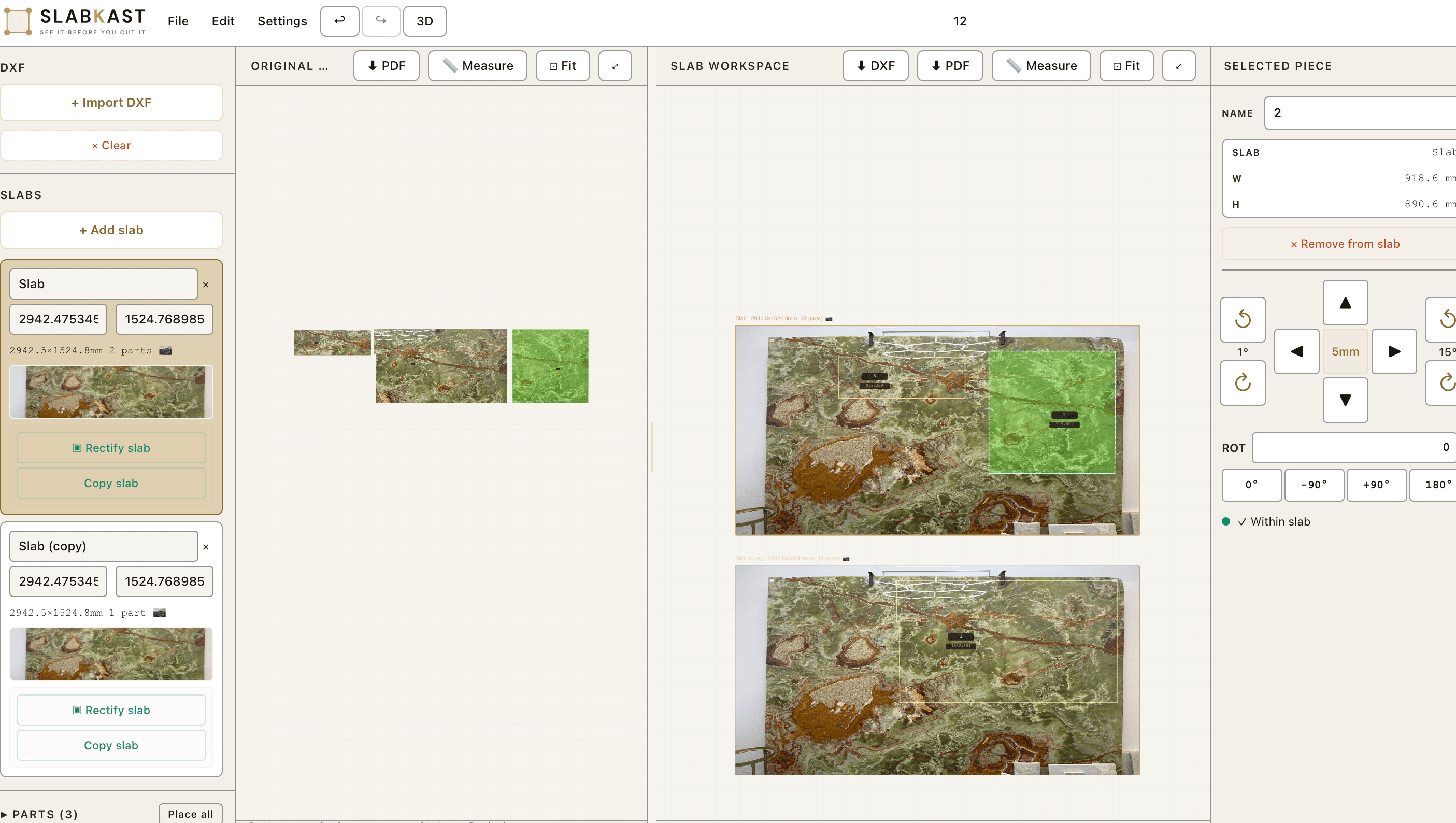
Search for “countertop visualizer” and you will find a dozen tools that let homeowners pick a material from a dropdown, select an edge profile, and see a 3D render of a generic kitchen. These tools are useful for material exploration during the early design phase. They answer the question: “What does white marble generally look like on a kitchen island?”
They do not answer the question that matters to the fabricator: “What does THIS slab look like when I cut THESE template pieces from it, in THIS arrangement, with seams at THESE locations?” That is a completely different question, and it requires a completely different approach.
Generic visualizers work from material libraries — tiled textures or stock slab photos that represent a material category. They cannot show the specific vein that runs through your client's slab. They cannot show the color shift from the left side to the right side. They cannot show the natural fissure at the 40-inch mark that the seam should avoid.
SlabKast works differently. You photograph the actual slab in your warehouse or at the distributor. You calibrate the image using physical measurement targets. Then you place the actual template pieces — imported from the field measure — onto the calibrated slab image. What the client sees IS what they get. The veins in the visualization are the veins on the physical stone. The color variation is real. The fissure is visible. There is no gap between expectation and reality because the visualization IS reality.
What makes real-slab visualization different
When you visualize countertop pieces on the actual slab photograph, you gain information that no generic render can provide. Here is what becomes visible — and why it matters for fabrication quality and client satisfaction.
Vein direction visible per piece
Each countertop piece shows exactly which veins run through it and in which direction. This is critical for vein matching at seams — the client and the fabricator can both see whether the vein pattern continues across the seam line or creates a visual break. On a veined marble like Calacatta Gold, this single detail determines whether the finished countertop looks planned or accidental.
Seam locations shown on real pattern
Seam placement is one of the most common sources of client complaints. A seam that falls in the middle of a prominent vein cluster looks wrong even if it is technically well-cut. With real-slab visualization, the seam line is visible on the actual stone pattern. The fabricator can reposition pieces to place seams in quieter areas of the slab, and the client can approve the specific seam location before cutting.
Color variation across the slab is visible
Most natural stone slabs are not uniform in color. A quartzite slab might shift from warm beige on the left to cooler gray on the right. If the main countertop piece comes from the warm end and the island comes from the cool end, the installed result can look like two different materials. Real-slab visualization makes this visible before the cut. The fabricator can adjust piece positions to minimize color mismatch across the kitchen.
Character marks and natural features are visible
Natural stone has character: fissures, fossil inclusions, quartz pockets, resin fills, crystalline formations. Some clients love these features. Others want to avoid them. With real-slab visualization, every character mark on the slab is visible in the layout. If a client wants the dramatic fossil inclusion centered on their island — or wants to avoid it entirely — they can see exactly where it falls relative to each piece.
This level of detail is impossible with generic renders. No stock texture library contains the specific slab sitting in your warehouse. No 3D kitchen visualizer shows the exact fissure at position 1,200mm on your client's quartzite. Real-slab visualization is the only way to close the gap between what the client expects and what the fabricator delivers.
For fabricators, designers, and architects
Fabricators
Countertop visualization reduces remakes by eliminating the expectation gap. When the client approves a layout on the real slab, they have already seen the veins, the seam positions, and the color variation. There is nothing left to surprise them at installation.
Visualization also speeds approvals. Instead of describing the layout over the phone or sending a rough sketch, you send a link to the actual slab with the actual pieces. The client understands immediately. Approval turnaround drops from days to hours.
Learn more about SlabKast for fabricators →Designers
Interior designers and kitchen designers can present slab options to clients before committing to a purchase. Photograph two or three candidate slabs, lay out the template on each one, and let the client compare. Which slab has the best vein flow for this kitchen? Where do the seams fall on each option?
This turns the slab selection visit from a guessing game into an informed decision. The client picks the slab that looks best with their specific template layout — not the slab that looked best as a raw rectangle leaning against the warehouse wall.
Learn more about SlabKast for designers →Architects
Architects specifying natural stone for commercial or residential projects can review material selections in context before approving. For large-format applications — reception desks, feature walls, bathroom vanities — seeing the actual slab with the actual piece layout eliminates the risk of an expensive material rejection at installation.
The visualization exports as a shareable link that the architect can review from any device. No software installation needed. No login required for viewing.
From visualization to production
The visualization in SlabKast is not a separate step that has to be recreated in a CAD program. The same layout that the client sees and approves is the same layout that exports as a DXF file. There is no redrawing. There is no re-entering of coordinates. What the client approved on screen is what the CNC cuts on the slab.
This matters because every time data moves between systems, errors creep in. A piece gets rotated 5 degrees during redrawing. A coordinate gets transposed during manual entry. A seam location shifts by 30mm because someone eyeballed it. The visualization-to-DXF pipeline in SlabKast is a single path: photograph, calibrate, layout, approve, export. No forks. No reinterpretation.
The DXF export produces a true-scale file in millimeters with piece outlines as closed polylines. Your CNC operator imports it, zeros the machine to the calibration targets on the slab, and cuts. The pieces land exactly where they appeared in the visualization. What the client saw is what the client gets.
For shops that use a formal client approval workflow, the visualization is the approval artifact. The client signs off on the specific layout they see. That approved layout — unchanged — becomes the production file. Accountability is built into the process.
Materials that benefit most from visualization
Visualization adds value for any slab material, but the return is highest for veined and highly variable stones where piece positioning directly affects the aesthetic outcome.
Marble is the classic case. A Calacatta slab with bold gray veins on a warm white background demands careful piece placement. The vein direction through the main countertop run, the vein continuity at seams, and the vein wrap on waterfall edges all need to be planned on the actual slab — not on a generic Calacatta texture.
Quartzite is equally demanding. Exotic quartzites like Taj Mahal, Cristallo, and Sea Pearl have dramatic movement that varies across the slab. A layout that looks balanced from one orientation can look chaotic when pieces are rotated 90 degrees. Visualization lets the fabricator and client experiment with piece positions on the real stone before committing to the cut.
Exotic granites — materials like Blue Bahia, Patagonia, and Van Gogh — have unique patterns that are effectively unrepeatable. Every slab is a one-of-one. Visualization is essential because the client cannot replace the material if they are unhappy with the layout. Getting it right the first time is the only option.
Even relatively uniform materials benefit from visualization. Solid-color quartz slabs still have seams, and seam placement affects the visual result. Consistent-background granites like Absolute Black or Steel Gray still benefit from seeing piece positioning and slab utilization. The fabricator can show the client how much material remains on the slab after cutting — useful for planning future projects or identifying where remnant pieces can be used.
The common thread: any time the client cares about what their countertop will look like — and they always do — visualization on the real slab is the most effective way to set accurate expectations and prevent post-installation disputes.
Countertop visualization questions
How accurate is the slab visualization compared to the finished countertop?
The visualization shows the actual slab photograph with template pieces placed at their real cutting positions. What you see is the real stone — real veins, real color variation, real surface characteristics. The positional accuracy of piece placement depends on the calibration quality, but is typically within 1-2mm across the full slab. The visual appearance is exact because it is a photograph of the actual slab, not a render or simulation.
What does the client see when I share a countertop visualization?
The client sees a top-down view of the slab with their countertop pieces positioned on it. Each piece is outlined and labeled. The client can see exactly which part of the slab each countertop piece comes from — including the specific veins, color variations, and surface characteristics that will appear in that piece. If you share via the approval link, the client can view the layout on their phone or computer without installing any software.
Can I show multiple layout options on the same slab?
Yes. You can create multiple layout versions on the same calibrated slab image and share each one with the client. This lets the client compare different piece positions — for example, one layout that centers a prominent vein across the main countertop piece versus another that avoids a natural fissure. Each layout version is independently shareable.
Does the visualization work with any stone material?
The visualization works with any material you can photograph: marble, quartzite, granite, soapstone, porcelain slabs, sintered stone, and engineered quartz. Highly veined materials like Calacatta marble and exotic quartzite benefit the most because vein direction and pattern continuity matter most on those materials. Solid-color materials still benefit from seeing seam placement and piece positioning on the actual slab.
What file format is the visualization image?
The visualization is displayed in SlabKast as an interactive web view, not a static file. When you share a layout for client approval, the client sees the same interactive view in their browser. You can also export a high-resolution screenshot for use in proposals, emails, or printed presentations. The underlying slab image is your original photograph, rectified to a true top-down perspective.
How is SlabKast different from generic countertop visualizer tools?
Most countertop visualizers show a generic material texture applied to a 3D kitchen render. They show what "marble" looks like in general — not what your specific slab looks like. SlabKast starts with a photograph of the actual slab. The template pieces are placed on the real stone image. Veins, color shifts, fissures, and character marks are all visible exactly as they exist on the physical slab. The client sees the real stone, not a category sample.
Show your client the real stone. Not a render.
7-day free trial. Photograph your slab, place the template pieces, and share the visualization with your client. See what real-slab countertop visualization looks like.
Ready to export for CNC? See how visualization connects to DXF export →