Slab Layout Without a Scanner: How Phone-Based Templating Works
For decades, creating a dimensionally accurate slab layout required a laser scanner costing $15,000 to $30,000 — plus annual calibration, dedicated computers, and specialized training. That priced out thousands of small and mid-size fabrication shops.
Today, a new approach is changing the economics of slab layout entirely. Phone-based templating software uses your smartphone camera and a set of calibration targets to produce the same result: a calibrated, CNC-ready layout on the actual slab photo. No scanner. No hardware investment. No maintenance contracts.
The Scanner Problem: Why Most Shops Don't Have One
Laser slab scanners like the LT-55 or SlabSmith systems have been the gold standard for digital slab layout since the early 2000s. They work well. They are precise. And they are expensive.
A typical scanner setup costs $15,000–$30,000 for the hardware alone. Add software licenses, annual calibration, a dedicated workstation, and training for your team, and the first-year cost can reach $30,000–$50,000. For large operations processing hundreds of slabs per month, this investment makes sense. For a shop doing 20–50 kitchens per month, the math is harder to justify.
The result: most countertop shops in the US still operate without any digital slab visualization tools. They rely on paper templates, manual measurements, and experience-based guesswork. When it works, it works. When it doesn't, the shop eats a $3,000–$4,000 remake.
This is the gap that phone-based layout tools are designed to fill — bringing digital layout to every shop, regardless of size or budget.
How Phone-Based Slab Layout Works
The core idea is straightforward: use a phone photo as the base image, then mathematically correct its perspective and scale using known reference points. Here is the process step by step.
Step 1: Photograph the Slab
Place the slab on a flat surface with good lighting. Take a photo with your phone from roughly above the slab, capturing the entire surface. The photo does not need to be perfectly overhead — the software corrects for perspective distortion. What matters is that the full slab and all four calibration targets are visible in the frame.
Step 2: Place and Measure Calibration Targets
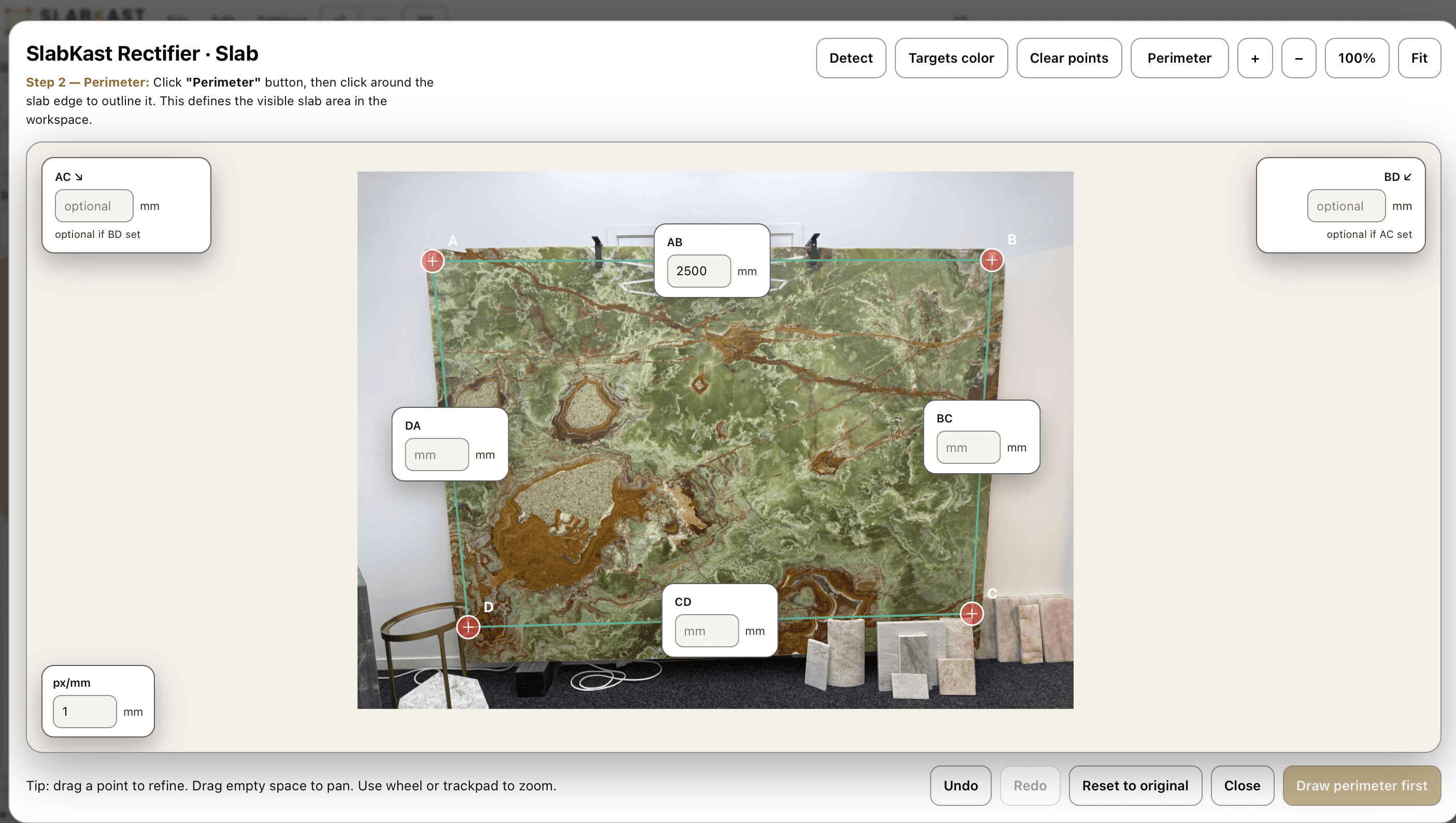
Place four calibration targets on the slab surface — one near each corner. Using a tape measure, record the distance between target centers. These measurements are the key to accuracy. The software uses the known distances between targets to rectify the photo into a dimensionally accurate representation. Think of it as giving the software a scale reference at multiple points across the slab.
Step 3: Upload and Calibrate
Upload the photo to the layout software — in SlabKast, this happens through the browser. Mark the target positions in the photo and enter the measured distances. The software performs a perspective rectification that transforms the angled phone photo into a true top-down view at real-world scale. Every pixel now corresponds to a known measurement.
Step 4: Layout Template Pieces
Import your template pieces — the cut shapes for the countertop — and drag them onto the calibrated slab image. Because the slab photo is now dimensionally accurate, you can see exactly how each piece fits. You can plan seam placement, check that pieces fit within the slab boundaries, and — critically — see how the stone's natural veins will flow through each piece. This is where phone-based layout has an advantage over scanners: you are working on the actual stone appearance, not a geometric outline.
Step 5: Approve and Export
Send the layout to the client for approval — a simple link they can open on their phone to see exactly what their countertop will look like on this specific slab. Once approved, export the layout as a DXF file. The DXF contains all piece outlines at true scale in millimeters, positioned exactly as they appear on the slab. Load it into your CNC software, zero the machine to the target reference points on the physical slab, and cut.
Accuracy: Can a Phone Replace a Laser?
This is the first question every fabricator asks, and it deserves a direct answer.
A laser scanner typically achieves sub-millimeter accuracy across the slab surface. Phone-based layout with calibration targets achieves 1–2mm accuracy. For countertop fabrication where standard tolerance is 2–3mm, phone-based accuracy is well within spec.
The accuracy chain works like this: the software is only as accurate as your target measurements. If you measure the distance between targets to within 1mm, the rectified layout will be accurate to within 1–2mm across the entire slab. If your measurements are sloppy — off by 5mm — the layout will be off by a proportional amount.
In practice, most fabricators find that careful measurement with a good tape measure produces layouts accurate enough for every standard countertop job. For extremely large pieces or unusual shapes where sub-millimeter accuracy is critical, a laser scanner may still be the better choice. But for the vast majority of kitchen and bathroom work, phone-based layout delivers the accuracy you need.
Cost Comparison: Scanner vs Phone-Based Layout
| Item | Scanner System | Phone-Based (SlabKast) |
|---|---|---|
| Hardware | $15,000–$30,000 | $0 (use your phone) |
| Software license | $2,000–$5,000/year | $149/month ($1,788/year) |
| Annual calibration | $500–$1,500 | Not required |
| Dedicated computer | $1,500–$3,000 | Any browser |
| Training | 1–2 weeks | 1–2 hours |
| Year 1 total | $19,000–$39,500 | $1,788 |
| Client approval | Not included | Built in |
The economics are stark. A phone-based system costs roughly 5–10% of a scanner system in the first year. Even if you factor in slightly lower precision for edge cases, the cost difference makes phone-based layout the rational choice for any shop doing fewer than 100 kitchens per month. For a broader look at the tools available, see our guide to the best stone fabrication software in 2026.
The Vein Matching Advantage
Here is something most people overlook when comparing scanners to phone-based layout: scanners capture geometry. Phone-based tools capture the stone itself.
When you work on a real photo of the slab, you can see exactly how veins, color variations, and natural patterns will flow through each piece of the countertop. You can rotate and flip template pieces to align veins across seams. You can show the client precisely what their installed countertop will look like — on this specific slab, with these specific pieces, in this exact arrangement.
This is not possible with a scanner that only captures the slab outline. Vein matching on a real photo is one of the strongest arguments for phone-based layout, especially for premium materials like marble, quartzite, and exotic granites where vein direction can make or break the final result.
Who Should Use Phone-Based Slab Layout?
Small to mid-size fabrication shops
If you do 10–80 kitchens per month and a $20,000+ scanner investment does not make financial sense, phone-based layout gives you digital capability at a fraction of the cost.
Shops that want client approval workflows
If you lose time to client disputes or remake requests because the customer could not visualize the result before cutting, a tool that lets you send an approval link with the actual layout on the actual slab eliminates that friction.
Mobile and multi-location operations
If your team works across multiple sites and you cannot move a scanner between locations, a phone-based tool travels with the team. Any phone, any location, any slab.
Shops adding vein matching capability
If you work with veined materials and want to offer vein-matched layouts without buying specialized hardware, phone-based layout is the fastest path.
When You Might Still Need a Scanner
Phone-based layout is not a universal replacement. There are situations where a laser scanner is the better tool:
- High-volume operations processing 200+ slabs per month where speed of scanning matters
- Jobs requiring sub-millimeter accuracy across very large surfaces (commercial installations)
- Shops that need deep AutoCAD integration as part of an existing CAD workflow
- Situations where the slab cannot be photographed with targets (already installed, inaccessible)
For the remaining 90% of countertop fabrication work, phone-based layout delivers the accuracy, workflow, and cost profile that makes it the better choice.
Frequently Asked Questions
Can you really do slab layout without a scanner?
Yes. Phone-based slab layout software like SlabKast uses calibration targets placed on the slab surface to rectify a phone photo into a dimensionally accurate representation. The result is a calibrated layout that can be exported to DXF for CNC cutting — without any scanner hardware.
How accurate is phone-based slab layout compared to a laser scanner?
With proper target placement and measurement, phone-based layouts achieve accuracy within 1–2mm across a full slab. For most countertop fabrication work, this is well within acceptable tolerances. The key to accuracy is precise measurement between calibration targets.
What equipment do I need for phone-based slab layout?
A smartphone with a camera (any modern phone works), four calibration targets (included with SlabKast), a tape measure, and a browser. That is the complete equipment list. No scanner, no tripod, no dedicated computer.
Can I export DXF files from a phone-based layout?
Yes. SlabKast exports CNC-ready DXF files at true scale in millimeters. The DXF contains all piece outlines positioned exactly as they appear on the slab. You load the DXF into your CNC software and cut — no scaling or rotation needed.
Does phone-based layout work for vein matching?
Yes. Because the layout is done on a real photo of the actual slab, you can see exactly how the veins will flow through each piece. You can rotate and flip pieces to align veins across seams — something that is difficult or impossible with a scanner that only captures geometry.
How long does it take to create a slab layout from a phone photo?
An experienced user can go from photo to completed layout in 5–10 minutes. The process is: photograph the slab, place and measure targets, upload to SlabKast, calibrate, drag template pieces onto the slab, adjust for vein matching, and export. The first time takes longer as you learn the workflow.
Try Phone-Based Slab Layout Free
7-day free trial. No credit card. No scanner required. Bring your own slab photo and see the result in minutes.
Start free trial