Slab Layout Software for Stone Fabrication Shops
From slab photo to CNC-ready cut file. No scanner hardware. No guesswork.
Your shop runs on speed and precision. Every hour a slab sits waiting for layout approval is an hour your CNC is not cutting. Every remake is money you already spent walking out the door. Slab layout software changes the math on both counts. Photograph the slab, place the pieces digitally, get the client to sign off, and send the DXF to the saw. That is the entire workflow.
A layout day without software
It is 7:30 in the morning. Your lead fabricator walks into the yard with a tape measure, a wax pencil, and a printout of the kitchen template. He pulls the slab off the A-frame, lays it flat, and starts holding paper cutouts against the surface. He squints at the vein pattern. He marks a seam line. He second-guesses it, wipes it off, marks a new one.
By 8:15 he has a layout he is mostly confident about. He takes a phone photo of the marked slab and texts it to the project manager. The project manager forwards it to the homeowner. The homeowner looks at a washed-out photo of wax lines on stone and says "I guess that looks fine?" That is not approval. That is confusion disguised as agreement.
Two weeks later, the countertop is installed. The homeowner sees the vein pattern running the wrong direction on the island. She expected the veins to flow left to right. They run front to back. The phone photo did not show that clearly. Now you are looking at a $4,000 remake — new slab, new fabrication, new install — and a client who will never refer you again.
This scenario plays out in fabrication shops every week. Not because fabricators are careless. Because the tools do not give clients a clear picture. A wax pencil on stone does not communicate vein direction. A phone photo of marks does not show what the finished countertop will look like. The gap between what the fabricator sees and what the client imagines is where remakes are born.
Then there is the approval bottleneck. You text the photo. The client does not respond until the next day. Your CNC sits idle. You move on to another job, and when the approval finally comes, you have to pull the slab back out, find the marks, hope they have not been smudged, and get back into the layout mindset. A job that should take one morning stretches across three days.
The cost is not just the remakes. It is the friction. The back-and-forth phone calls. The "can you send another photo from a different angle?" The "I want to see what it looks like if you move that piece six inches to the left." Every one of those requests means walking back to the yard, moving physical material, and taking another photo. That is your most experienced fabricator spending his day as a photographer instead of running the saw.
A layout day with SlabKast
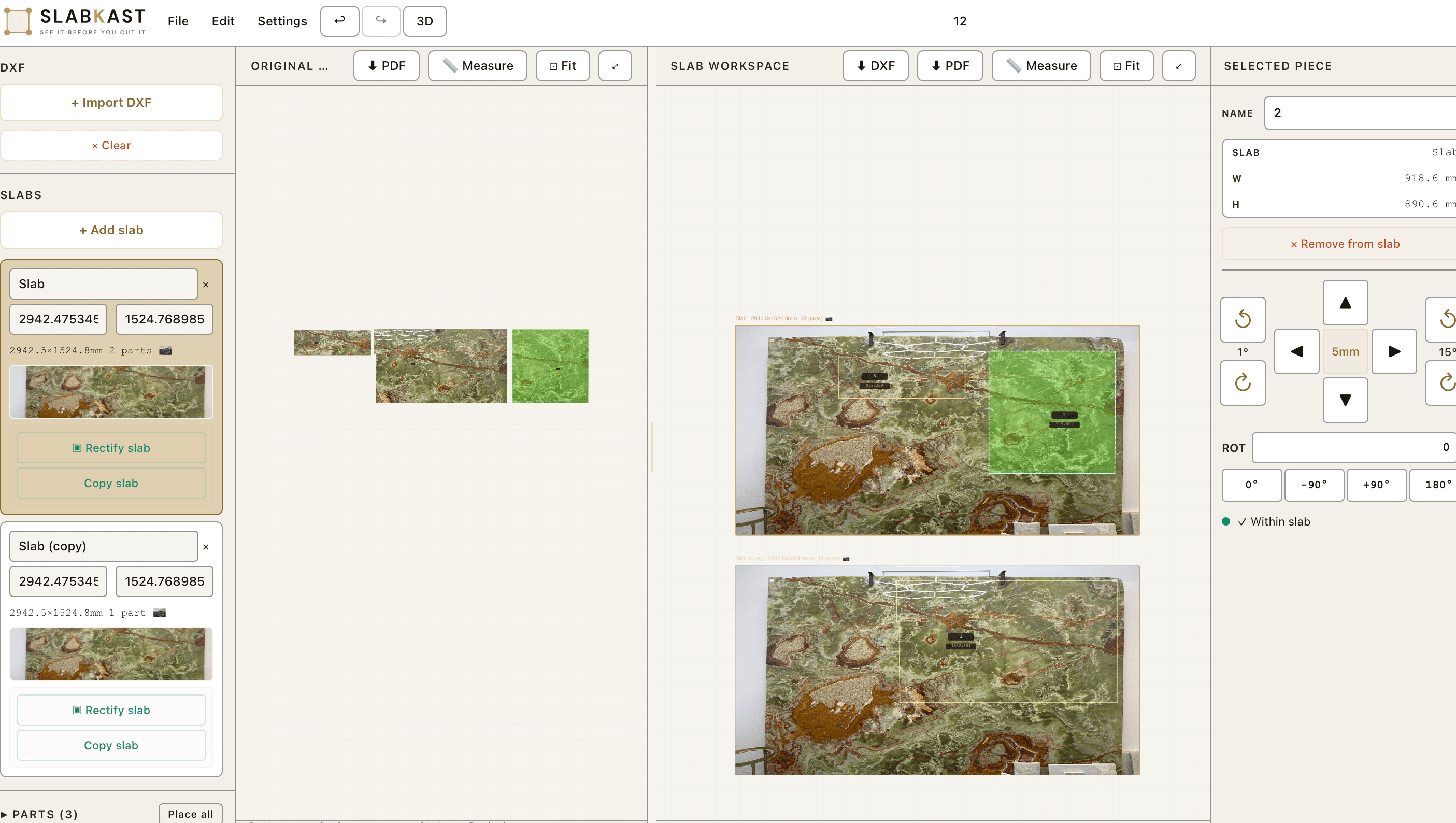
Same morning. Same slab. Different process. At 8:00 AM, your team member places calibration targets on the slab and takes a photo with their phone. They do not need to pull the slab down or lay it flat. Photograph it right on the A-frame if that is where it sits. Upload the photo to SlabKast and mark the slab dimensions. The software corrects the perspective and gives you a dimensionally accurate digital surface.
By 8:15, the layout is done. Your DXF template pieces are dragged onto the calibrated slab image. You can see exactly how the granite vein pattern flows through each piece. You adjust the island piece two inches to the left because the vein looks better there. You check the seam alignment. It takes seconds, not minutes.
At 8:20, you hit "Share" and your client gets a link. Not a blurry phone photo of wax marks. A clean, interactive view of their actual countertop pieces placed on the actual slab they selected. The veins are visible. The seams are marked. There is nothing to imagine because it is all right there.
The client opens the link at 8:45 during their morning coffee. They see the layout. They want the L-shaped piece rotated slightly so the vein curves toward the sink. You get the notification, open the layout, drag the piece, and send an updated link. The whole revision takes 90 seconds.
By 9:00 AM, you have written approval. Digital. Timestamped. No ambiguity. The client saw the layout on the real stone and said yes. There is no "that is not what I expected" conversation two weeks from now because they saw exactly what to expect.
At 9:05, you export the DXF. By 10:00 AM, the file is on your CNC and the saw is cutting. The entire process — photograph, layout, approval, export — happened in under two hours. Your fabricator spent zero time in the yard holding paper against stone. Your CNC was not waiting for approval. And the slab never moved off the A-frame until it was time to cut. That is what slab layout software does to your morning.
What changes for your shop
Fewer remakes
When clients see the layout on the real slab before cutting, surprises at install drop to near zero. You stop eating $3,000 to $5,000 remake costs because expectations are set visually, not verbally.
Faster approvals
A shareable link replaces phone calls, text-message photos, and in-person slab-yard visits. Clients approve from their couch. Average approval time drops from 2 to 3 days down to a few hours.
Better slab yield
When you can see every piece on the slab digitally, you find the optimal placement faster. Remnant areas become visible. Backsplashes and vanity pieces fit into spaces you would have wasted.
CNC-ready output
The layout exports as a standard DXF file. No redrawing, no manual transfer from paper to software. The file goes straight to your saw. Fewer transcription errors, faster time to cut.
Every slab, every material
SlabKast works with anything that comes in a slab. You photograph it, you can lay it out. The software does not care whether the surface is polished, honed, leathered, or brushed. It works on the visual appearance of the stone — the part your client actually cares about.
Heavily veined materials like marble and quartzite benefit the most from digital layout because vein alignment is critical. But even uniform materials like engineered quartz benefit from the yield optimization and client approval workflow. And exotic stones like onyx — where a single slab can cost $8,000 or more — make digital layout a requirement, not a luxury.
Seam planning that prevents callbacks
Seams are where layouts fail. Not because fabricators cannot cut a tight joint — most shops produce seams that are nearly invisible from a structural standpoint. The problem is the visual break. When veins do not flow across a seam, the client notices. When color shifts at the joint because the pieces came from different areas of the slab, the client notices. When the seam falls in the middle of a visible run instead of behind the faucet, the client really notices.
With slab layout software, you see the seam on the slab before you cut. You position pieces so the seam falls in the least visible location. You check that the vein pattern flows naturally across the joint. If it does not, you slide the piece a quarter inch and check again. This kind of micro-adjustment is impossible with wax pencils. On screen, it takes three seconds.
The most common seam mistakes fabricators make: placing the seam where vein direction changes abruptly, ignoring color density shifts between the left and right side of a slab, and positioning the seam at the front edge of an island countertop where it is visible from the living room. Every one of these mistakes is preventable when you can see the full layout digitally.
For L-shaped kitchens and U-shaped kitchens, where multiple seams are unavoidable, digital planning becomes even more valuable. You coordinate all seam positions at once instead of dealing with them one at a time on the slab surface. The result is a layout where every seam is intentional, not accidental. Your vein matching becomes part of the seam decision, not an afterthought.
What your clients see
The approval workflow is the part most fabricators underestimate. You know what the finished countertop will look like. You have been doing this for years. But your client has never bought a stone countertop before. They do not know how to read wax marks on a slab. They do not understand what "the vein will continue through the seam" means in practice. They need to see it.
When you send a SlabKast approval link, your client sees their countertop template pieces placed on the real slab photograph. Not a render. Not a mockup. The actual stone they picked out at your showroom or warehouse, with their actual kitchen shape overlaid on it. They can see where the veins run through the island. They can see where the seam falls on the L-shaped run. They can see the waterfall edge piece sitting next to the top surface.
No imagination required. That is the point. The "I trusted you and it does not look right" conversation does not happen when the client has already seen and approved the exact layout. You have a digital record of their approval. You have proof that they saw the vein direction, the seam location, and the piece placement before you made a single cut.
For designers and architects who specify stone on behalf of their clients, this approval workflow is even more valuable. They can share the layout link with the homeowner, the general contractor, and the builder simultaneously. Everyone signs off on the same visual. No one is surprised at install. That kind of coordination used to require an in-person slab yard visit. Now it happens from a browser. Read more about the full approval workflow without a scanner.
Questions fabricators ask about slab layout software
How long does it take to create a slab layout from a phone photo?
Most fabricators complete a full layout in 10 to 15 minutes from the moment they snap the photo. That includes uploading, calibrating, placing all template pieces, and checking vein alignment. Once you have done three or four layouts, you can usually finish in under 10 minutes.
Do I need special lighting or a dedicated photo area to photograph slabs?
No. SlabKast works with natural daylight or standard shop lighting. You photograph the slab wherever it sits in your yard or warehouse. Place calibration targets on the slab, take the photo with your phone, and the software handles perspective correction. No photo booth, no controlled lighting setup.
Can my client approve the layout from their phone?
Yes. When you finish a layout, you generate a shareable approval link. Your client opens it on any device, sees the template pieces placed on the actual slab photo, and can approve or request changes. They do not need to download anything or create an account.
What happens if the client wants to move a piece after they see the layout?
You open the layout, drag the piece to the new position, and send an updated approval link. The entire revision takes two or three minutes. Compare that to redoing a wax-pencil layout on the physical slab, which means pulling the slab back out, repositioning, re-marking, and hoping you remember where the original marks were.
Does slab layout software replace my CNC programming workflow?
No. SlabKast handles the layout and visualization step. Once you and your client approve the placement, you export a DXF file that goes into your existing CNC programming software. SlabKast sits between template measurement and CNC cutting. It does not replace your saw software or your CAM system.
Can I lay out pieces across multiple slabs for one project?
Yes. For large kitchens or commercial projects that require two or three slabs, you can work across multiple slab photos within the same project. This lets you plan which pieces go on which slab, balance vein continuity across the full installation, and maximize yield from every slab in the lot.
Bring your own slab photo. See the layout in minutes.
Start a free trial with no credit card. Photograph any slab in your yard, upload it, and build your first layout today. Most shops are running production layouts by the end of their first week.
Looking for broader fabrication tools? See how SlabKast fits into your full shop workflow →